Enabling Auto Login & High Performance Power Plan
By enabling automatic login, you shave off unnecessary seconds at boot and avoid session delays that can stack up — especially on a streamlined, gaming-only system.
Meanwhile, activating the High Performance power plan ensures your CPU and GPU consistently operate at their full capabilities without being throttled by energy-saving mechanisms. This is crucial for achieving stable, high FPS in competitive games via GameLoop.
PART 1: Enable Automatic Login
Auto-login skips the Windows password prompt, logging you into the desktop immediately after boot. This is ideal for single-user setups optimized for gaming.
📍 Step-by-Step:
Press
Win + R, typenetplwiz, and hit Enter.
(This opens the User Accounts panel.)In the list, select your Windows user account.
Uncheck the box that says:
“Users must enter a user name and password to use this computer.”Click Apply.
A dialog will appear asking for your password.
Enter your current Windows password twice and click OK.
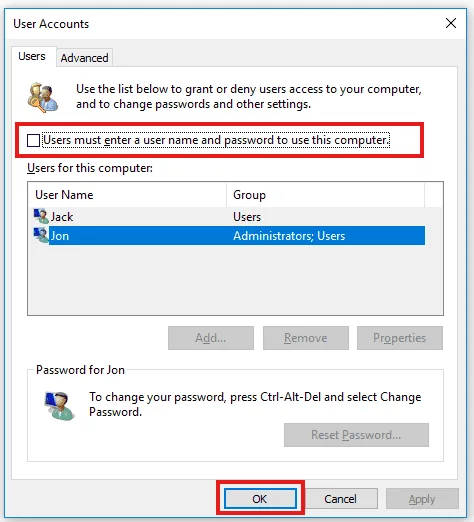
Done! Your system will now log in automatically upon startup.
PART 2: Activate High Performance Power Plan
By default, Windows may be running a “Balanced” or “Power Saver” plan — which limits CPU and GPU performance. Let’s fix that.
📍 Step-by-Step:
Press
Win + R, typecontrol, and press Enter.Go to:
Hardware and Sound → Power OptionsClick Show additional plans if necessary.
Select High Performance from the list.
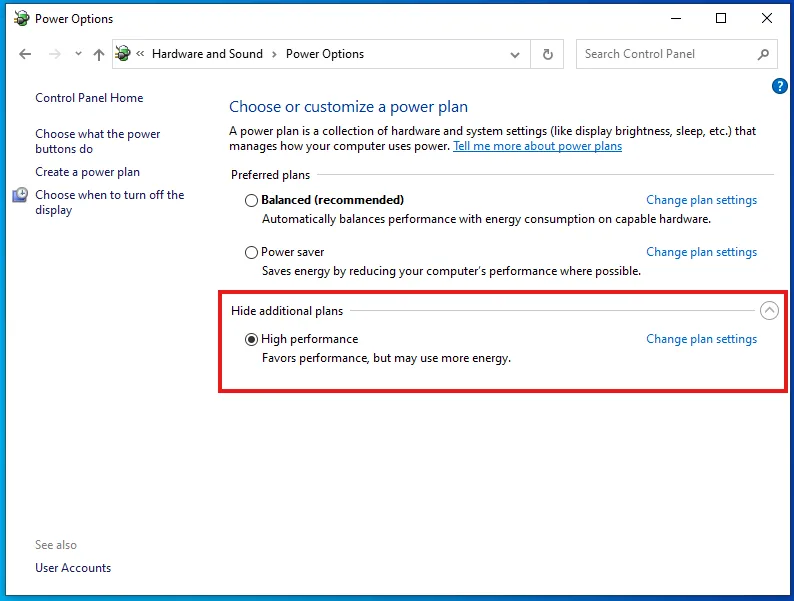
💡 Note: On laptops, this setting may drain battery faster — but on a desktop or plugged-in device focused solely on gaming, it’s ideal.
Final Result
Your system boots straight to desktop with no delay.
Your CPU and GPU run at full power with no throttling.
Faster loading and improved in-game responsiveness on GameLoop.